
We manage your shop's IT.
Gravy IT watches every computer in your shop, fixes the common problems on its own, and puts a real person on anything it can't, with a reply within 2 business hours. It lives right inside Gravy, for one flat monthly price that is a fraction of what an IT company charges.
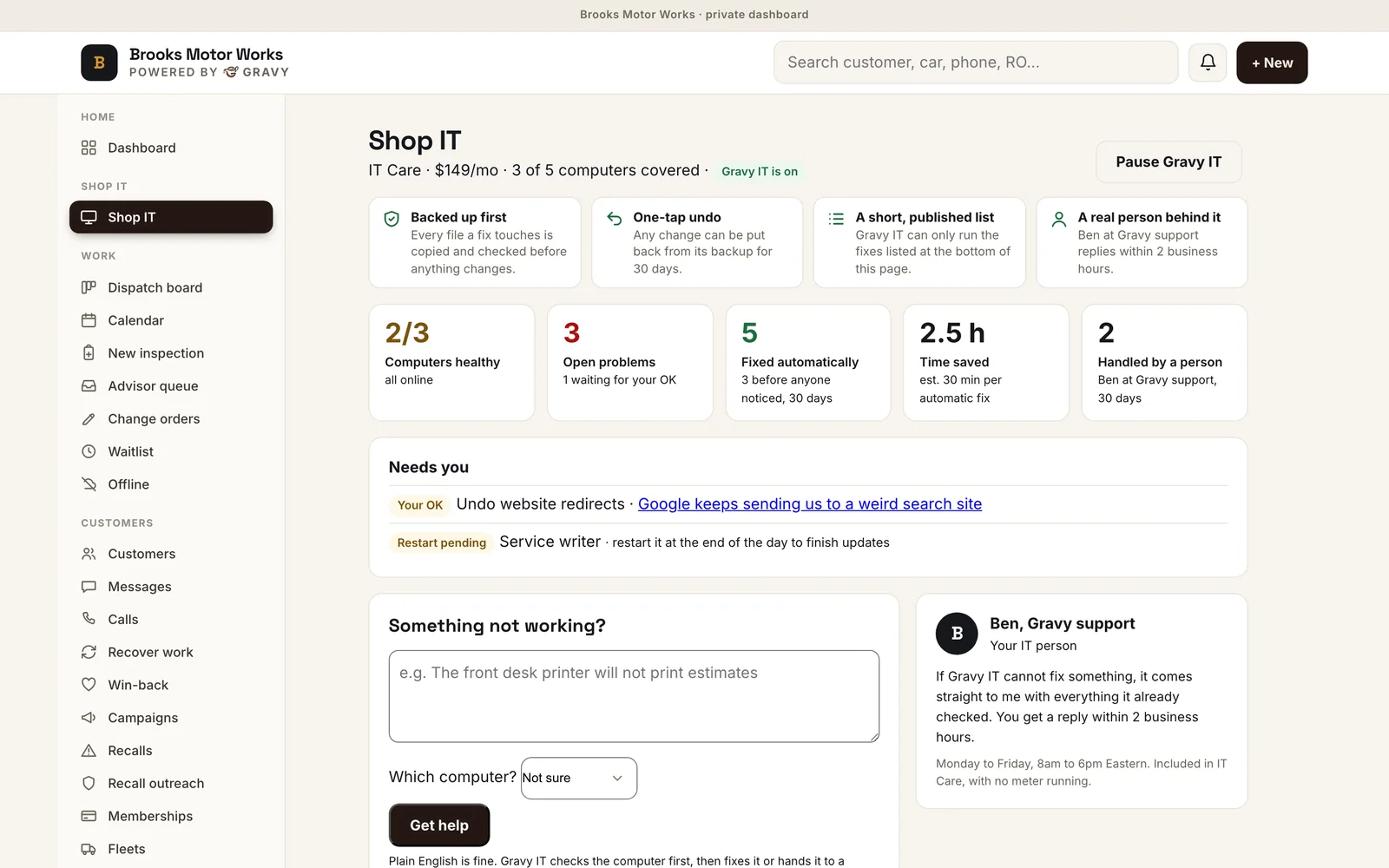
The real Shop IT screen, from our Brooks Motor Works demo shop.
Your computers, handled.
We set up every computer
We install the small Gravy Helper on each shop computer with you. It only connects out to your Gravy account, opens nothing on your network, and runs as a normal user.
It fixes problems before you notice
Every day Gravy IT checks each computer. Stuck print queues, a wrong clock, a stopped print service and a full disk get fixed automatically, often before anyone notices.
Your staff just describe it
"The front desk printer won't print." Claude reads the problem and that computer's live health check, picks the fix from a fixed list, and it runs. If it needs a person, Gravy support takes it from there.
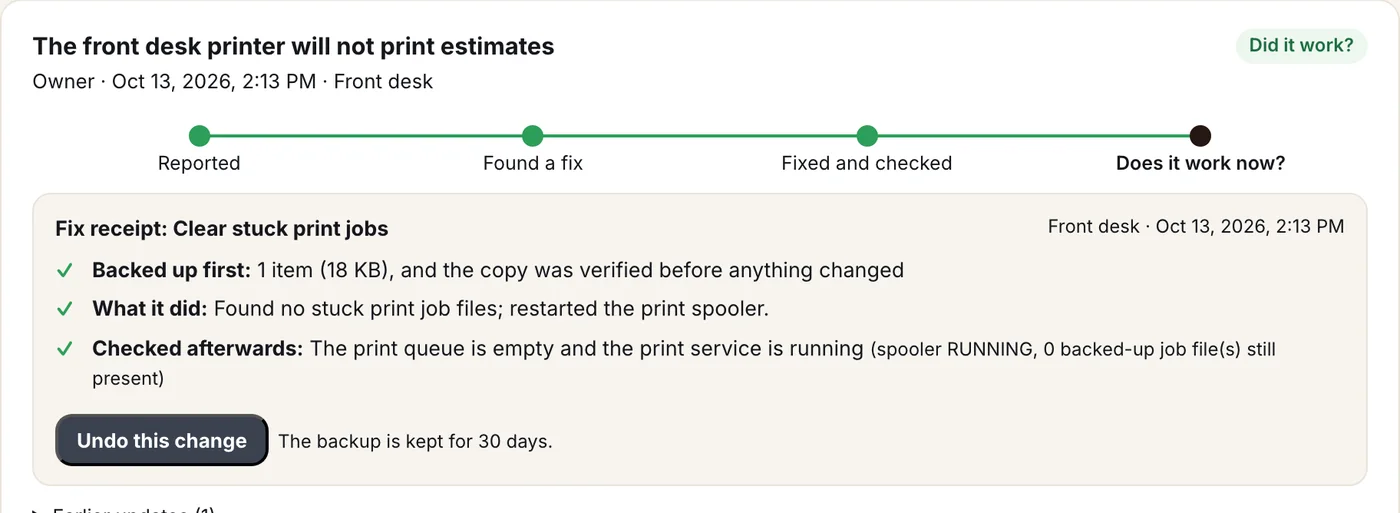
From "it won't print" to fixed, in a minute
Staff type the problem in plain English. Claude explains what it will do, the fix runs on that computer, and every fix leaves a receipt: what changed, what was backed up, and the check afterwards. One tap undoes it.
- Plain English in, plain English back
- A progress tracker on every problem
- A receipt for every fix, with one-tap undo
- Still broken? It goes straight to a person
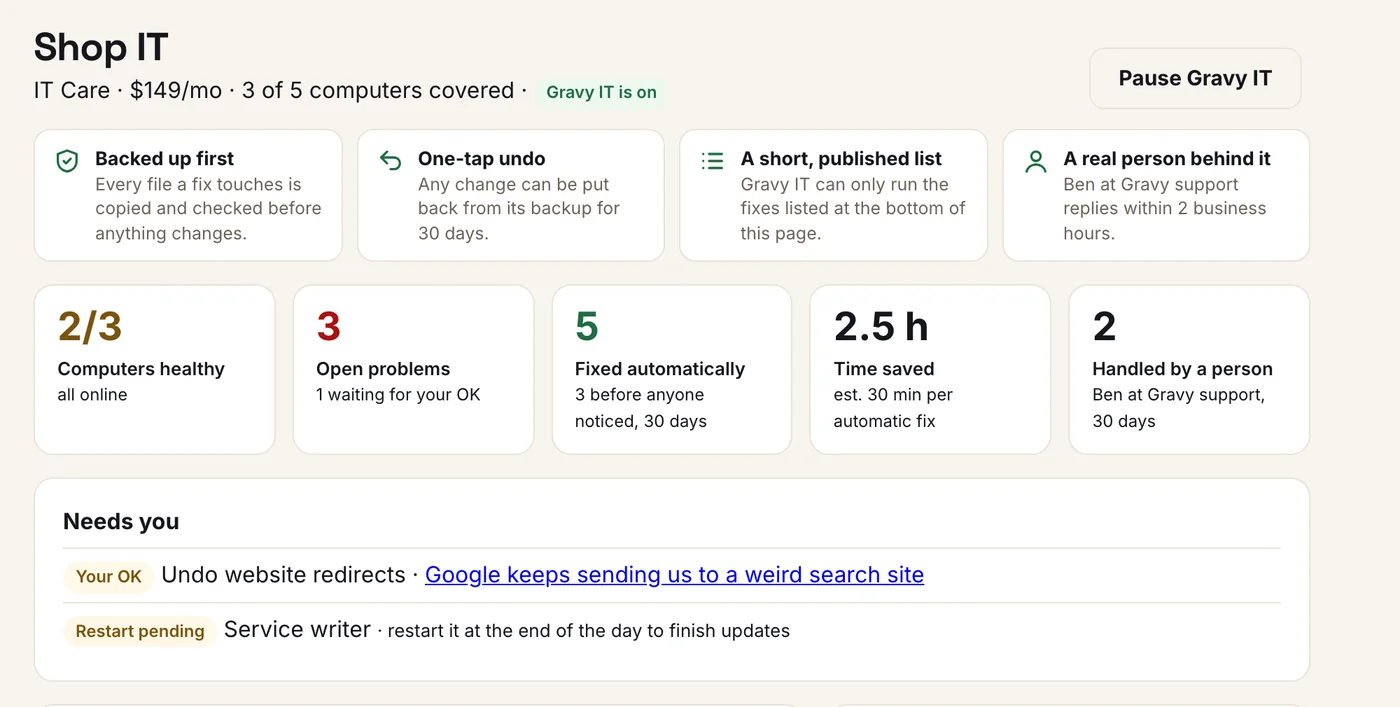
Know where every computer stands
Computers healthy, open problems, fixes made automatically, the time they saved you, and how many a real person handled, with a short list of anything that needs you.
- Fixed automatically, with "before anyone noticed" called out
- A plain tip next to every warning
- A pause switch: nothing changes until you resume
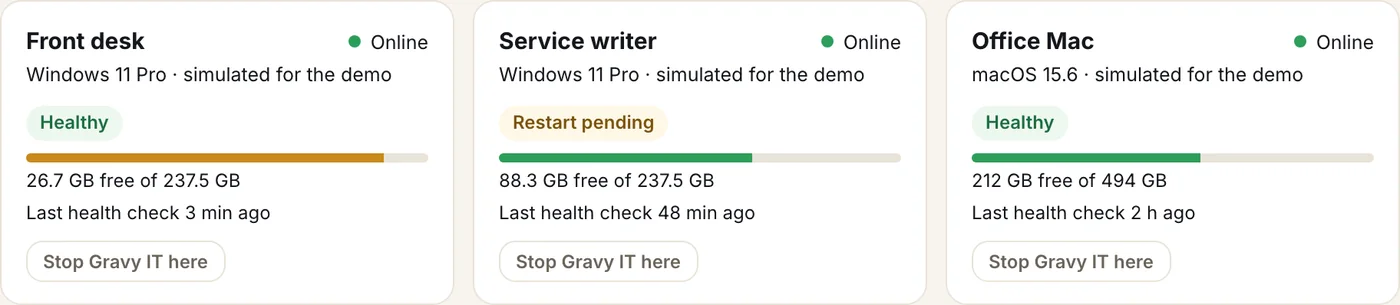
Warnings before they become problems
Each computer reports its health every day: low disk, a restart pending, stuck print jobs, no internet, a wrong clock, low memory.
- Windows and Mac
- Online status, disk space and last check
- You can switch any computer off
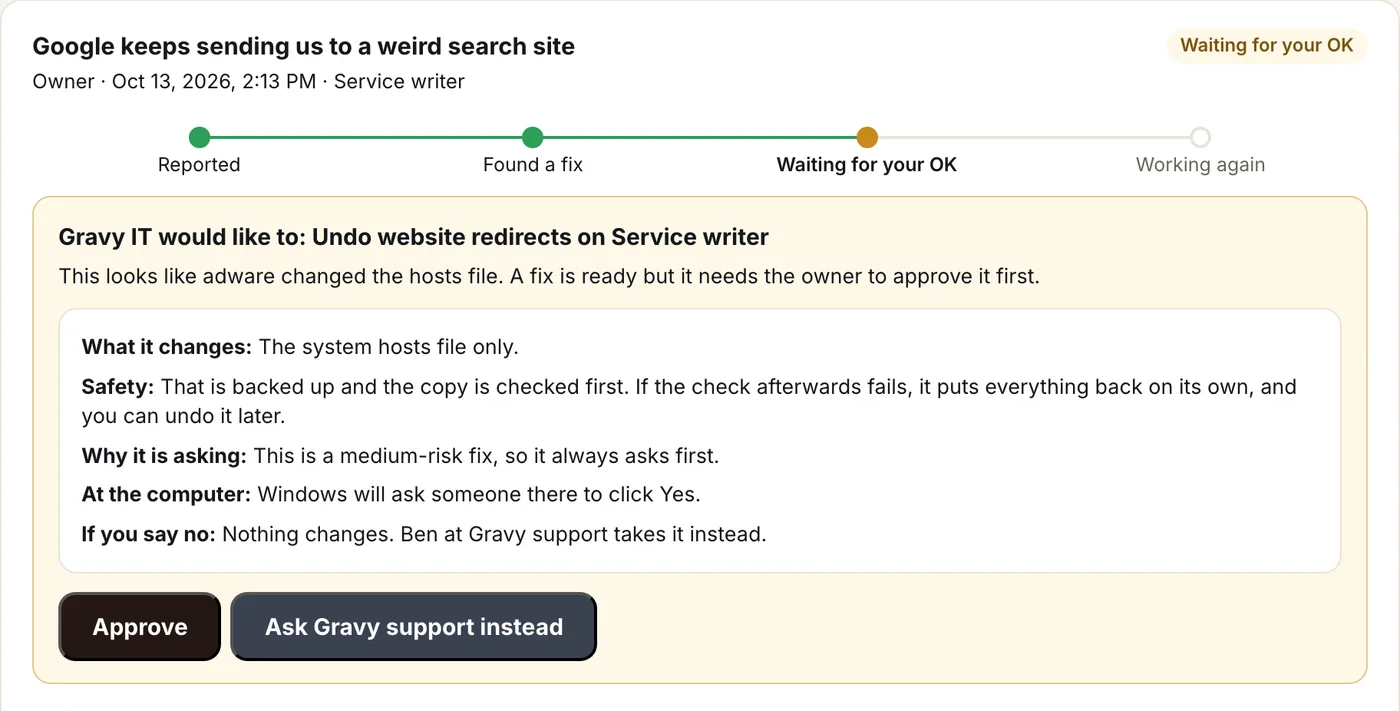
Nothing bigger happens without your OK
When a fix is more than routine, Gravy IT stops and asks first, spelling out what it changes, why it is asking and what happens if you say no. Say no and a person takes it instead.
- Exactly what changes, in plain words
- One switch pauses Gravy IT entirely
- Say no and Gravy support takes it
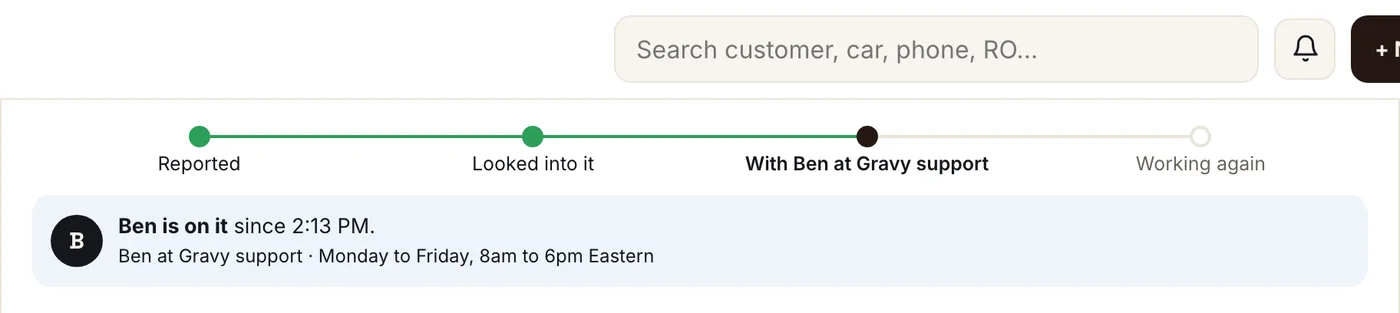
A reply within 2 business hours
When Gravy IT cannot fix something, it goes to Ben at Gravy support with everything it already checked. The ticket shows when to expect a reply, and the moment he picks it up.
- A reply-by time on every hand-off
- See when a person is on it
- No meter running

IT, next to the rest of your numbers
The owner home screen shows Shop IT beside revenue and open jobs, so you see it without going looking.
- One tap into the full Shop IT screen
- Turns red only when something needs you
Safe by design, not by luck.
Backed up before every change
Before the first change, every file, setting and service a fix touches is backed up and checked. If a fix doesn't check out, it undoes itself. Any fix can be undone later in one tap.
A fixed list, never free rein
The AI can only choose from a short list of published fixes, and every choice is checked twice, on our side and on the computer, before anything runs.
You stay in charge
Bigger changes wait for your OK, with what they change and why spelled out first, and Windows asks someone at the computer before anything that needs admin rights. Prefer to approve everything, or pause it entirely? One switch.
What Gravy IT fixes on its own
- Stuck print queue. Clears the jobs jamming the queue and restarts the print service.
- Printer shows offline. Restarts the print service so the computer sees the printer again.
- Printing to the wrong printer. Sets the right default printer and keeps Windows from switching it back.
- Wrong clock, "not secure" websites. Resyncs the clock, which fixes certificate errors on secure sites.
- Disk almost full. Clears old temporary files, after backing them up.
- One website will not load. Flushes the stale DNS cache.
- Search redirects and popups. Resets a hijacked hosts file, with your OK first, and flags the PC for a person to check.
- Something unclear. Runs a full health check of the computer before deciding anything.
What goes to a real person
Card readers and payment terminals, scan tools, shop software accounts, passwords, new software, hardware and anything unusual go straight to Gravy support, with the full history attached, so nobody starts from zero.
Also checked every day
Your domain, your website's security certificate and your email setup (SPF, DKIM, DMARC), with a heads-up before anything expires, so invoices and estimates do not land in spam.
A fraction of an IT company
Managed IT companies typically charge $100 to $185 per user every month, and many won't take a shop with fewer than 20 users.
IT Checkup
A daily check of your domain, website and email, with an alert when something needs attention.
IT Care
Everything in Checkup, plus the help desk and automatic fixes on up to 5 computers ($15/mo each after that), and a real person whenever it can't fix something, with no meter running. A reply within 2 business hours, Monday to Friday. $1,490 if paid yearly.
Shop IT is an add-on for Gravy shops. The AI runs on your own Anthropic account, typically a few dollars a month.
One-time setup: $75 per user ($199 minimum). Only if your shop needs it: Microsoft 365 or Google Workspace security setup $399 (up to 10 users, then $25 per user), taking over from another IT provider $299, each server or shop-software server $299, each extra location $299, cleanup of a neglected computer $99 each. Half off setup when you pay yearly, and setup can be split over 3 months. Help from a person has no meter; fair use is about 3 hours a month. Projects like new computers, moves or network changes are quoted at $150/hr and only done after you approve. It starts with a free 15-minute call.
Shop IT FAQ
Can it see our files or customer data?
No. The Gravy Helper reads system health (disk, printers, network, updates, the clock) and only touches the files and settings a fix declares in advance. It never opens your documents or customer records.
What if a fix goes wrong?
Every change is backed up and verified before it happens. If the check afterwards fails, the fix undoes itself. You can also undo any fix later in one tap, and backups are kept for 30 days.
Does it work on Macs?
Yes for health checks, temp-file cleanup, DNS and hosts-file fixes. Windows-only fixes, like restarting the print service, go to a person on a Mac.
Can I stop it from changing anything?
Yes. One switch pauses Gravy IT: health checks and support keep working, and any fix it wants to make waits for you. Undo always works, even while paused.
Is the AI changing things on its own?
Only low-risk fixes from the published list, and you can switch that to always ask first. Bigger fixes always wait for your OK.
Who is the real person?
Ben at Gravy support. Problems the AI cannot fix come to us with the computer's health check and everything already tried, and you get a reply within 2 business hours (Monday to Friday, 8am to 6pm Eastern).
Is support metered?
No. Covered problems and the help around them are included, whether that takes five minutes or an hour; fair use is about 3 hours of a person's time a month. Bigger projects, like setting up a new computer or moving the shop network, are quoted first at $150/hr and only done after you approve.